A Window Into A Running Machine
Published
Of Accountants and Developers
My last 25 years in coding professionally for a salary were spent on Databases and manipulating them. I used Microsoft SQL Server for work, played with many others, especially Postgres in my free time. I come from an era where “a computer program” was something accountants used because they were mostly the ones that could afford to pay for the privilege and any business that touched “computers” did Databases, record keeping, basically. I was not much different, after a certain point in time: I also worked with databases, just in a different kind of way. The pieces here on this web site tell where and how I digress in the most fun ways possible, subjectively. Before that “a quarter of a century” mark things were different for me. When everybody was thinking about business record keeping, I was looking into educational software, games, algorithms, simulations, monitoring. I am taking you back to 1995, when the last bit, developing a monitoring system for a live, real-time hardware pipe was my job.
The Factory and the Warehouse
It was a factory assembling televisions with “tubes”, CRT, cathode ray tubes: the technology before the flat panels that line up our walls today. They were bulky, heavy and hard to handle, especially the larger ones you’d want to watch your favorite team play. The CRTs were imported, some electronics were assembled on soldered boards by automated machines and the finished product was half-assembled by human labor. The TVs were wrapped in foam and bubble sheets so they would not “break” even if they were dropped from a certain height. Then they were put in cardboard boxes or “crates” if you will. Different sizes, different weights. They ended up on a conveyor belt, out of the manufacturing pipe line and on their way to the intermediate storage area. They waited there until an order to load them into a truck and ship them to a retail store, came from … somewhere.
Because of size and weight and the fragile nature of the finished product, the part about storage was automated as much as possible. I developed the application monitoring that part so this is where I go into some detail.
The storage area was not uniform, and it could not afford to be. Most of the shelving sides carried six levels. Some carried only four, because the larger TV sets needed more room above them and those sides gave up two levels to gain clearance on the rest. Each aisle had shelving on both sides, and the crane served both, the forks extending left or right, to the side that would be served, unlike a forklift on wheels where it is always the front. Each side ran deep, dozens of positions along it, and a pallet carried up to twelve boxes.
There sat “a fixed at the base” robotic arm. Its job was to pick boxes from the belt, neatly arrange them onto the pallet in front of it. It had suction pumps with pipes attached and could lift and hold even the largest TV set’s box. Remember, different sizes meant different arrangement and number of boxes on each pallet and obviously there were pallets half-full or even empty. There was a magazine of empty pallets and some were stored in the depths of the warehouse shelves to save space.
The conveyor belt brought boxes from manufacturing, the arm P-Robot for palletizing arranged them on pallets and the cranes put and retrieved them from the shelves in the storage area. The belt extended to the loading area where another robotic arm, D-Robot for depalletizing worked the muscles: It lifted the boxes and put them on a shorter belt where workers carried them to the trucks.
The conveyor belt had IR sensors to check boxes and pallets moving on each segment, motors that were controlled so any individual segment of the belt could be advanced and stopped to avoid crashes and congestion. And obviously some 1D barcode scanners to read labels off the boxes to track which serial numbered TV set was sitting on which pallet and where in the warehouse.
The whole automated operation was orchestrated with Siemens PLCs, I made every effort not to touch: I had no idea how to program them. Real-time hardware management is a totally different beast than writing applications for a human being. There was a support engineer from Siemens. He wrote a code block inside my code: I didn’t touch theirs but they did touch mine. The final code shows it is commented out!
The monitor
It was the MS-DOS era. I needed graphics for the monitor as you can imagine. That was a challenge in itself: using Turbo Pascal negated the hardship considerably because I was already familiar with how to draw things on the screen, not just print scrolling text pages upon pages. I created a font that I drew pixel by pixel because I needed smaller digits that would not overflow the section boxes on the screen.
The drawing was not the only thing the compiler did not give me. Turbo Pascal came with a mouse unit but I wrote my own anyway and I named it the same thing, so mine is the one the compiler picked up. The code I developed talked to the mouse driver directly in x86 assembly: reset the driver to find out whether a mouse existed at all, set how far it had to travel before it counted as movement, set the shape of the pointer. I asked the driver how much memory it needed in order to remember its own state, allocated exactly that much, and then saved and restored the pointer around every redraw because drawing over a pointer smears it across the screen. That is why almost every routine in the monitor hides the pointer first and puts it back at the end. In the early days, the mouse driver and its rendering were the most optimized part of Windows: If that lagged even a tiny bit, the users would’ve given up using the OS.
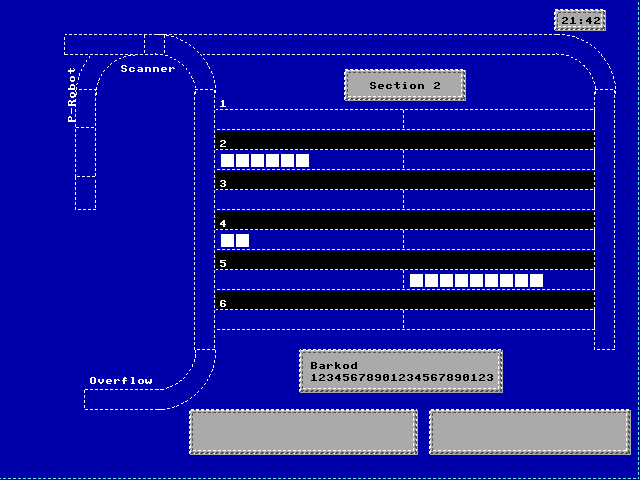
Why bother with a mouse interface where the status is drawn on the screen and you can sit back and enjoy the view, you may ask: It was there to ask one question. Click a box on the pallet display and a panel opens headed Barkod, showing that box’s 23-character serial. Click an empty slot and nothing happens, which is the correct behaviour and was deliberate. It only worked on this view, because this is the view that draws boxes. The scanners on the belt read every box as it went past, so the system already knew which television set was in which box on which pallet. What the mouse added was the person at the desk asking that question by pointing at the screen instead of waiting for a report. He can then actually go over to the belt area and confirm the barcode and be happy knowing the system is not lying to him.
The second thing the pointer did was end the program. The clock in the corner was the quit button. Click it and the monitor closes. Very strange UI design, I cannot remember the reason behind it, still thinking about it…
The screen was a mere 640x480x16, the x16 being 16 unique colors on the screen at one time. Pause here and check your screen resolution, especially if you are reading this on a desktop or a laptop. Today “screen estate” means something completely different.
The monitor started by showing the top view of the warehouse part: the P-Robot, aisles and the belt in front of them. Most of the activity and intelligence belonged to this area. Anything that is stuck here means somebody actually has to go there and handle the boxes manually. My AI agent reconstructed the drawing on the monitor screen from the source.
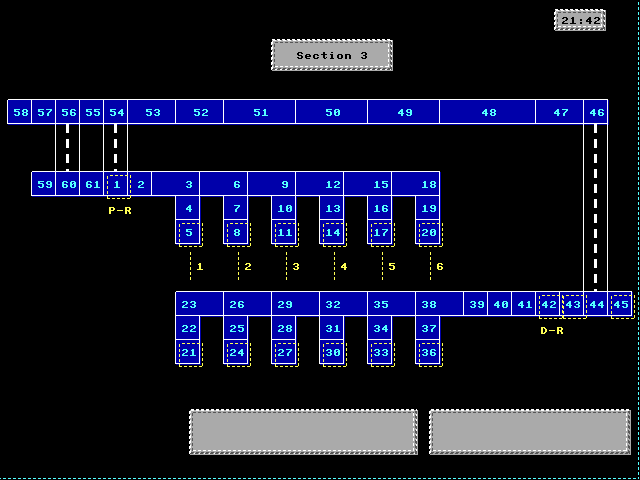
The yellow marks are added now, for this piece. They were not on the screen when I developed the application: The person monitoring it was probably one of the people that actually assembled this pipe line. I asked the AI agent to put them there so you can see what I was looking at: the two robot arms and the six aisle cranes, each labelled. The numbers 1 to 6 are the crane lanes. P-R is the arm that builds the pallets, D-R is the arm that takes them apart again. Each crane owns one column of that drawing: the position it takes a pallet from is in the same column above, and the position it hands one back to is below. That is not a drawing convention, it is the machine. Six cranes, an in and an out each.
You can see the sections where the robotic arms stood and handled the boxes on pallets. The cranes storing and retrieving the pallets. The person monitoring the flow can see if each section has a pallet on it at the moment, real-time.
Every position on that drawing carries a number, and there are sixty-one of them, all addresses: the code moves pallets by number, and every command that sends a pallet somewhere names one. Behind each number sits a single flag saying whether something is standing there, and which pallet it is. The drawing and the numbering were designed together, so the shape on the screen is the shape the software itself thinks in. Sixty-one is declared in the hardware itself, not counted after the fact.
All this is read-only as you can imagine. The monitor never touched any data, that was the PLC. One button on the whole application that the person can push: A kill command that stops the whole operation.
I “talked” to the PLC on IPX/SPX, a networking protocol from before TCP/IP became the dominant one. I constructed the view on the screen for boxes on the belt, pallets, warehouse shelves and an overflow area where the system skipped a beat, lost track of the box and it needed to be re-introduced from that area to the main belt.
I had to write C code to speak the IPX/SPX code, Pascal to render the “real” life situation on the screen.
For the quarter of a century that followed I did the accountants’ kind of work: databases, records, keeping in order what a business had already done. Let me emphasize: I was very happy doing it because I did not work on what the accountants saw (in all my coding life I never developed an accounting application) but rather the behind-the-scenes parts of the operations and that part also happened to use databases. What I built in 1995 was something else altogether. It was a picture of a machine while it was running so that people would not have to walk out onto the floor to find out what was happening to it. One keeps the past in order, the other shows the present of a machine. Somewhere between those two is most of what I have been paid to do and eventually retired from.
And the magic happened: There were no more actual people walking among the belts, checking whether the cranes had dropped anything. Instead there were one or at most two, looking at the computer screen. I built their “window” into the storage area, from the point where manufacturing and packaging stopped to the loading bay where human workers took over once more for the trucks.