The widget that dictates my day
Published
Savings, anyone?
Anything you read here comes with the tag “as of this writing…”
One of the harness/model combinations I use day to day is Claude Code. Like most frontier models, it comes with two very specific usage windows: a 5-hour one and a weekly one. Your consumption of credits in each “window” is determined by your plan, the model you use and how you use that model. This piece is not about how to save tokens, rather how you can “see” how you use them and if saving is even necessary.
This is how the Claude App reports your usage back at you:
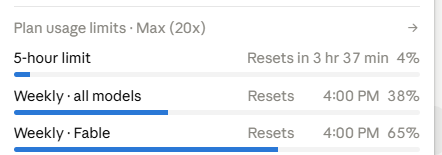
The app knows. It shows percentages, resets, and details if you want, and it still does not answer the only question I actually have clearly: am I ahead of my budget, or behind it?
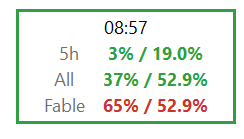
Enter my own little widget, Claude-specific, always on top and living at the corner of one of my desktops, telling me exactly that.
Budgets, budgets
If you are on a Pro plan, you get two lines after the current time: The 5-hour and All lines. All is short for “Weekly - all models”. If you are on any Max plan, you also have Fable access and it is the third line.
How to read this: 5 hour is at 3%. After the morning rituals, I sat in front of my computer, asked Claude “where were we?” got a few lines of a state response, gave it my first prompt. That took less time than a full dedicated run so, I am perfectly behind my quota for the 5-hour window. In detail, if you care, roughly 20% of the time (1 hour of 5 hours) had passed the moment the widget last updated its view; I only used 3% of the credits inside that window. Very happy, indeed. I can pick up pace, spawn another session, whatever I want. All is at 37% against 52.9%. Same style of reporting. I am roughly in the middle of my week (people have different weekly reset points, as far as I know) but used a little over a third of my tokens FOR ALL models under the Claude ecosystem. Again, perfectly fine for now. Fable, that’s a different story and it requires caution. The weekly quota for Fable also resets at the same minute as all models combined (including Fable itself), but I am way above my “pace budget”. The rest of the week will be rationing Fable usage.
The build is the part I keep smiling about:
- No installer, no SDK, no runtime download, no admin right.
- Windows has shipped a C# compiler inside the box for years, at C:\Windows\Microsoft.NET\Framework64\v4.0.30319\csc.exe, and Pacer is one 53 KB source file it compiles happily. build.cmd generates the icon, compiles, and runs the self-checks.
- SELFTEST FAILED means the build is not usable. The tool refuses to exist in a broken state.
Design
It is for Windows, my main environment.
The OAuth token that the Claude Code CLI keeps on my own machine is read at runtime, used as one authorization header, and discarded. Never printed, never logged, never cached, never sent anywhere else.
The pace is computed against the reset time my account reports, not a hardcoded schedule. It should work for yours, too, nothing is hardcoded.
There are three preset font sizes for all those with huge monitors and bad eyesight.
It tries to remember its size, position and the monitor it was on, last, and most of the time, succeeds.
The border is a separate signal from the numbers. Green border, the reading is current. Red border, the reading is older than fifteen minutes, and the numbers on screen are history rather than status. The usage endpoint Pacer reads is undocumented; it is the one Claude Code itself uses, and it can change or vanish without notice. When that happens, every failure path degrades to a stale reading rather than a wrong one. That sentence is the whole design.
The repo is public, MIT, one commit: github.com/bkoken20/pacer. No binaries in it; a public repo ships source. Read README.md, as usual. It clearly states the requirements. If you run Claude Code on a Pro or Max plan and refresh the usage page more often than you admit, build it yourself. It takes one double-click.