Your presence is required elsewhere
Published
Every machine I was allowed to touch
Once, there was only SETI@home. SETI (Search for Extraterrestrial Intelligence) is a scientific area whose goal is to detect intelligent life outside Earth. It had its own client you ran on your computer. It was disguised as a screensaver. That guaranteed it worked when your computer was idle, so it never stole resources when you were actually doing stuff.
SETI@home piggy-backed Arecibo Radio Telescope was capturing data for other projects and also got data from Green Bank Telescope. Data SETI@home recorded from Arecibo were literally shipped to Berkeley by mail, first on backup tapes, later on 2TB SATA disks, to be analyzed.
There it was divided into chunks or work-units and doled out to people like me all over the world to be analyzed. As far as I remember, the same block of data was sent at least three times, to three different computers, and two must agree on the results to be accepted. Later I learned that the “demand” for data was so high, Classic sent out the same block to 7 computers on average to keep them busy and happy.
There was a number: 6.64h/wu, measured with the typical computer “power” I had at the time, making it my average. So, it means I contributed 823442 hours or 93.9 one-cpu years to search for extraterrestrial intelligence, on every machine I was given permission to run it.
We felt we were part of something big. The warm feeling that justifies some decision you make and lets you sleep peacefully at night. We were donating the time our computers were idling.
The Leaderboard
With the help of my AI assistant, I dug into the statistics.
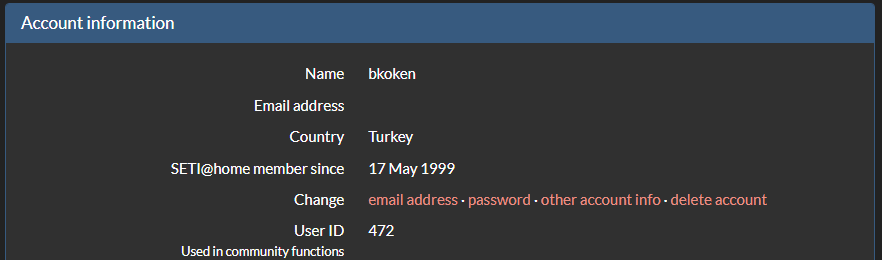
I needed help: There was SETI@home Classic. You downloaded it from the projects own website, Berkeley University, SETI Institute, http://setiathome.ssl.berkeley.edu/
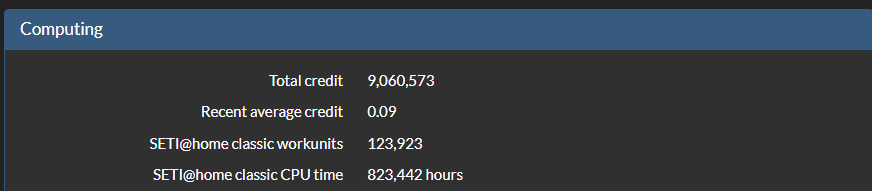
Then in 2004, the project moved under BOINC, Berkeley Open Infrastructure for Network Computing. That meant the client can download a project’s “engine” as a “plug-in”. That way you were able to decide how much CPU time to donate for your pet projects, if you have more than one.
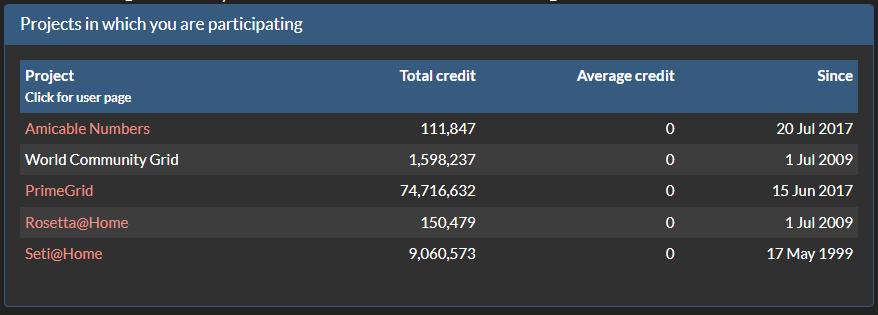
My assistant explained to me: The number 472 was significant. When SETI@home moved under BOINC, they imported the Classic user database and gave IDs according to world contribution rank at the moment.
Then the BOINC years came and went. I participated in other projects. I was in the 10. position for SETI@home in my country and 13395 in the world of total 4049936 BOINC users, overall contribution for all projects.
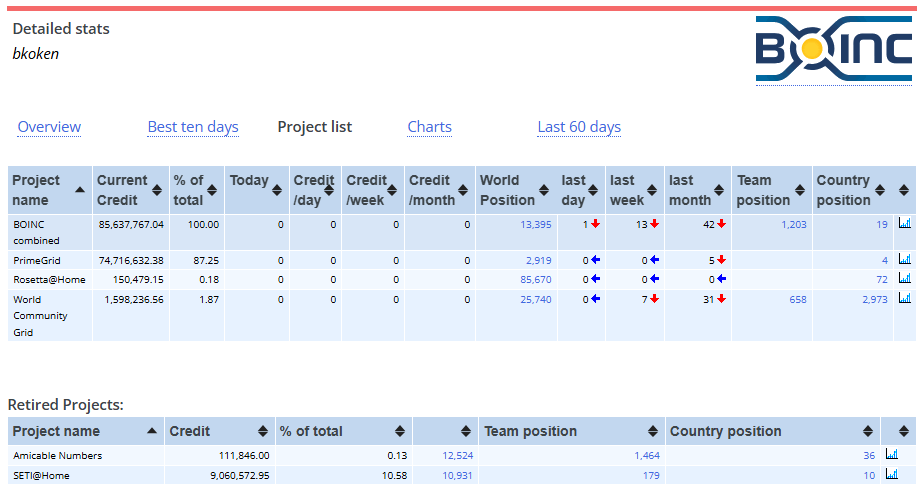
SETI@home was “put to hibernation” in 2020 as the managers of the project call it. Hibernation is better, I think, than retired or frozen. All those computers were needed at the time. Compute was scarce. Now there are more ways to analyze data without knocking everybody’s door and ask for CPU time. Yes, you guessed right what that way is.
Your presence is required elsewhere
Not many projects are after your CPU cycles anymore. There are many who wound down, there are some still going strong. If you think of CPU time donation, check them, please. Also there are new “organizer” websites like Zooniverse, where collective effort takes new shape as Human Time donated, not CPU time. Many projects, depend on human-level classification, most of that is actually piped to AI training, and then AI can really do better and maybe do it on its own. The mechanic is inverted. The model now labels the easy cases and routes its low-confidence ones to humans, whose labels retrain it. Clearest proof for this is Einstein@Home. It is the archetypal CPU-cycle project; it now also runs as a Zooniverse project, “Pulsar Seekers” where humans do the visual work. The compute project became an attention project.
It is thriving: Zooniverse passed the billionth classification mark in June 2026. By their calculation of 1 second for one classification, that is 31.7 years of full-time effort; their stats server puts it at roughly 2000 years collectively.
Anyway, this does not change the concept: Granted, it is not a screen saver anymore, it is screen time from your life, but it is donation again. Helping science and brave science people from the comfort of your home, being a part of something, again.
NASA projects on Zooniverse extend this in a really spectacular way. Here are the numbers. 31 NASA projects on Zooniverse, 120 million classifications from 324,000 volunteers since 2020, 96 papers, 56 with NASA citizen scientists as co-authors.
I highly recommend you check this “Citizen Science” concept, if you have the time and the means. Maybe, fame and glory is waiting for you just around the corner.
What I went looking for
But I, being me, if you read even half of the pieces on the website, tried to move to the edges of the map, to uncover new territory. Nothing ground breaking, but a little bit different.
Ladies and Gentlemen, I present you with James Webb Space Telescope. Rather, not the telescope at L2 point one and a half million kilometers away from Earth, but its publicly available data. Here is the problem statement: I want to do science, at home, on my 12-core, 24-thread, 128GB memory, 16GB VRAM GPU box. I am perfectly aware that I will not “discover” the “next big thing” in any scientific topic. I want to do science, and while doing it, I want to learn things. But, let’s not be selfish. The thing I do while learning should benefit someone, somewhere. For me, the journey is what matters, and for a “real” scientist, the result may matter.
I thought of JWST data. I watched it soar to the skies on board an Ariane 5. I saw the first deep field photo published, exact single tally isn’t officially pinned down to one rigid number, but NASA and ESA describe the view as containing thousands of individual, distinct galaxies.
So, the discussion with my AI agent began. Where can I download JWST data and how? Which format? Can we develop scripts to analyze the data? What will we be analyzing anyway? How long will it take? Will my box be capable enough? Will we be using the GPU? Where can I publish the results to make them available and hopefully useful?
Your ordinary, everyday, run of the mill chat with an ordinary chat bot, as you can see.
Thus born the JWST analyzing Jupyter notebook AI guided me in building. And I lost the notebook. How dumb can I be, sometimes?
What I found
AI to the rescue, again. I did not have the notebook anymore, but the chat session is still available and the UI even let me share it. Aha. This is what I did: I gave the sharing link to AI, it “reconstructed” the steps in the notebook, going through all prompts and responses and now I have the scripts again. I am working on the scripts to make them publicly available on github so someone else can pick her/his FITS frame data from MAST and run them and add to the very small pile of data already analyzed (for some specific outcome).
The best part is how our past conversation with the chat bot ended. It said:
“Would you like to proceed to Track B (NGC 7469 IFU) next? If yes, I’ll start with Step 1 — dataset download and inspection, just like we did for CEERS.” You got it, it is asking me to proceed with another avenue of exploration. Track B (NGC 7469 IFU cube) is described as “begin spectral-cube exploration, line identification, and redshift measurement”.
And my honest answer was:
“No. I did not learn any of the steps above. I just copy/pasted your code into the notebook. All steps are complete. Now create a learning session for everything we have done. Expand all acronyms in first use. Explain all steps, why, what has been done. Assume zero previous knowledge of astronomy, JWST data, terms, goals. Go into extreme detail.”
This last prompt was for closing the circle, my goal “learn something, while producing something useful”.
Needless to say, there follows a long response, starting with “0) what are we even looking at?” and I am still studying it, now that I have access again and on the project once more.